
Master Microsoft Project for Technical Professionals
ONLINE TRAINING – Evening Classes (18:00 – 21:00)
Day 1: Monday, 10 August 2026 (3HRS) – Day 4: Thursday, 13 August 2026 (3HRS)
IN-PERSON TRAINING
Day 1: Tuesday, 29 September 2026
Day 2: Wednesday, 30 September 2026
📍 Birchwood Hotel & OR Tambo Conference Centre, Johannesburg
From Beginner to Advanced in Just 2 Days

Don't Miss the Early-Bird R 7,450 Excl. VAT Valid Until 30 June 2026
Eliminate scheduling chaos, automate reporting, control project costs, and manage construction timelines like a professional using Microsoft Project.
Welcome to Microsoft Projects for Construction Professionals
Is Your Project Schedule Controlling You?
Most Project Managers face similar Pain Points when organising and scheduling their critical project and operational tasks.
- Endless spreadsheet updates
- Missed deadlines
- Resource clashes
- Poor reporting visibility
- Delayed contractor coordination
- No schedule recovery strategy
- Manual reporting wasting hours
This course teaches you how to build, control, optimize, and automate professional project schedules using Microsoft Project.
Master the skills to professionally plan, control, optimise, and automate construction project schedules using Microsoft Project.
Practical, hands-on training designed for project managers, planners, engineers, and construction professionals who want to improve project delivery, reduce delays, and gain complete visibility over project performance.

What You will Learn

By the end of this course you will be able to:
✅ Build complete project schedules from scratch
✅ Create resource-loaded construction programmes
✅ Apply dependencies, leads, and lags correctly
✅ Track cost and schedule performance
✅ Analyse earned value and TCPI metrics
✅ Identify schedule risks automatically
✅ Create reusable templates for future projects
✅ Automate repetitive tasks with advanced MSP Macros
Workshop Highlights
Day 1 - Tuesday 29 September 2026
Foundations & Planning
- Project setup and defaults
- Calendars and working time
- Resource creation and costing
- Task creation and estimation
- Dependencies, leads & lags
- Resource allocation
Day 2 - Wednesday 30 September 2026
Control, Reporting & Automation
- Baselining and approvals
- Progress tracking
- Earned value analysis
- Resource leveling
- Schedule recovery
- Reporting dashboards
- Advanced macros

Why Professionals Attend This Course
Construction-Focused
Built around real-world construction case studies.
Hands-On Learning
Practical exercises throughout both days.
All Versions Supported
Applicable to Microsoft Project 2010 through latest editions.
Advanced Automation
Unique macro training rarely included in MSP courses.
Immediate Workplace Application
Use templates, reports, and tools immediately after training.
Who Should Attend this 2-Day Practical and High Impact Course
This workshop is ideal for professionals working across the construction industry, including individuals who are new to project management and those involved in planning, coordination, execution, scheduling, project controls, and project delivery roles.
- Planning Coordinator
- Project Coordinator
- Programme Manager
- Contracts Manager
- Contract Administrator
- Quantity Surveyor
- Commercial Manager
- Resident Engineer
- Civil Engineer
- Mechanical Engineer
- Electrical Engineer
- Infrastructure Engineer
- Cost Engineer
- Estimator
- PMO Manager
- PMO Analyst
- Operations Manager
- Maintenance Manager
- Facilities Manager
- Risk Manager
- Project Administrator
- Engineering Manager
- Shutdown Coordinator
- Turnaround Planner
- Procurement Manager
- Resource Planner
- Construction Supervisor
- Site Engineer
- Planning Consultant
- Project Consultant
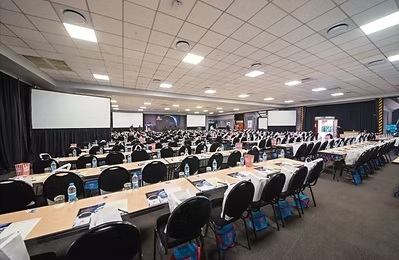
Your Exclusive Training Venue
Birchwood Hotel & OR Tambo Conference Centre
Event Information
Venue
Birchwood Hotel & OR Tambo Conference Centre. Visit www.birchwoodhotel.co.za
Dates
ONLINE TRAINING – Evening Classes (18:00 – 21:00)
Day 1: Monday, 10 August 2026 (3HRS) – Day 4: Thursday, 13 August 2026 (3HRS)
IN-PERSON TRAINING
Day 1: Tuesday, 29 September 2026
Day 2: Wednesday, 30 September 2026
📍 Birchwood Hotel & OR Tambo Conference Centre, Johannesburg
Duration
2 Intensive Days (14 Hours)
Requirements
- Laptop required
- Microsoft Project 2010 or later installed (Software provided if required)
- Basic MS Office knowledge recommended
Frequently Asked Questions (FAQs)
Do I need prior MSP experience?
No. The course starts at beginner level and progresses to advanced techniques.
Which version of MSP is supported?
All versions from 2010 onward.
Will I receive a certificate?
Yes, delegates receive a certificate of completion from Open Business group and PMTA. After the course you are also eligible to take the official Microsoft Projects Assessment via Microsoft directly to receive a Microsoft Official badge and certification.
Is this practical or theoretical?
Highly practical with real mnodern work and construction related case studies.

Meet Your Master Speaker and Trainer
Dave Fourie is an experienced Master Trainer and project management consultant with over 20 years of industry experience across construction, engineering, infrastructure, IT, and business operations.
Over the past 15 years, he has trained more than 18,000 delegates across Africa, Europe, and the Middle East, specialising in Microsoft Project for construction and project-based environments.
Dave is highly regarded for his practical, engaging, and hands-on facilitation style, helping professionals develop real-world skills in project scheduling, resource management, cost control, reporting, project controls, and Microsoft Project automation.
Combining global best practices with real project experience, Dave delivers interactive training that equips delegates with practical tools and techniques they can immediately apply within live projects and professional environments.

Dave Fourie
PRINCE2® Practitioner
Managing Successful Programmes (MSP®)
P3O®, Six Sigma Green Belt
Professional Scrum Master (PSM I)
ITIL® (IT Service Management)
Total Quality Management (TQM)
Stay Up To Date
Connect with us to be added to our exclusive training newsletter and project management training updates
Pricing & Registration
Book Now! Seats are limited and Early-Bird Special is valid until 24 July 2026.
Early Bird Special
- ✔ Training material
✔ Lunch & refreshments
✔ Practical exercises
✔ Certificate of completion
✔ MSP templates & macros toolkit
Standard Registration
- ✔ Training material
✔ Lunch & refreshments
✔ Practical exercises
✔ Certificate of completion
✔ MSP templates & macros toolkit
Group booking Discount
- ✔ Training material
✔ Lunch & refreshments
✔ Practical exercises
✔ Certificate of completion
✔ MSP templates & macros toolkit